
NetFront Life Screen V21.0.0 - Get APK
You'll be able to download in few seconds.
Publisher Description
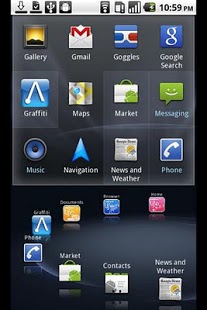
Download NetfrontTM Life Screen - A great Homescreen replacement with a cool user interface, a great app launcher and automatic updates
from your social networks and phone apps.
Features:
- Sleek user interface with 3-D effects
- 3-D App launcher for all apps installed on your device
- Customizable app carousel with instant access to your favorite apps and services, and the latest updates
- Evernote® integration – one-touch access to the latest updates to your Evernote® account
- Instant viewing of updated from your social networks - Facebook, Twitter, Mixi
- Add your choice of widgets to the home screen display
- Customize background with your choice of wallpaper
NetFrontTM Life Screen is a home screen (homescreen) replacement app with an intuitive interface that delivers previews of social network
updates as well as phone services data. Use the app launcher cube to quickly find any installed app and launch it. New in version 2, see
and access your latest Evernote® account updates. NetFront Life Screen replaces your built-in homescreen and gives you one-touch access to
the information you would currently need to launch several apps to see.
NetFrontTM Life Screen uses an advanced 3-D UI engine. It lets you interact with your Android phone with 2 main UI elements.
• The rotating 3-D app cube lets you quickly find and launch any app that is installed on your phone.
• The app carousel shows apps that you use most often. You can customize it by adding apps into the carousel or removing them. Screen lets
you access and launch apps by rotating the carousel. It has a “hot spot” position - move any app in the carousel to the hot spot, and
instantly see recent actions and updates for that app. Examples:
- Evernote Integration. Rotate the ring to Evernote and see the latest updates to your Evernote account. Not using Evernote? Get a free
account at http://www.evernote.com/about/referrer?code=access-screen
- Twitter , Facebook and Mixi . Tap on either of these services to see the latest updates from your Facebook and Mixi friends and the
people that you follow on Twitter.
- Browser. See your browser bookmarks by rotating or tapping the browser icon. Go to any of your bookmarked pages quickly by tapping on an
entry.
- Contacts. Scroll through your favorite and recent contacts and access them with the contacts service icon.
- Call History. Missed a call from someone? Call them back easily with a tap on an entry in the list that displays when you choose the call
history service icon.
Background: Pick a wallpaper picture of your choice for the home screen background.
Widgets: Add your choice of widgets to the default home screen display so that anytime you press the home button, your chosen widgets, up
to three (space permitting) will be displayed with the ring of services
About NetFront Life Screen V2
The company that develops NetFront Life Screen V2 is ACCESS CO., LTD.. The latest version released by its developer is 1.0.0.
To install NetFront Life Screen V2 on your Android device, just click the green Continue To App button above to start the installation process. The app is listed on our website since 2011-10-31 and was downloaded 0 times. We have already checked if the download link is safe, however for your own protection we recommend that you scan the downloaded app with your antivirus. Your antivirus may detect the NetFront Life Screen V2 as malware as malware if the download link to com.access_company.android.lifescreenyahootw is broken.
How to install NetFront Life Screen V2 on your Android device:
- Click on the Continue To App button on our website. This will redirect you to Google Play.
- Once the NetFront Life Screen V2 is shown in the Google Play listing of your Android device, you can start its download and installation. Tap on the Install button located below the search bar and to the right of the app icon.
- A pop-up window with the permissions required by NetFront Life Screen V2 will be shown. Click on Accept to continue the process.
- NetFront Life Screen V2 will be downloaded onto your device, displaying a progress. Once the download completes, the installation will start and you'll get a notification after the installation is finished.
Program Details
System requirements
Download information
Pricing
Version History
version 1.0.0
posted on 2011-10-31
version 1.0.0
posted on 2011-10-31
Several fixes and updates
Disclaimer
External Download
We do not host NetFront Life Screen V2 on our servers. We did not scan it for viruses, adware, spyware or other type of malware. This app is hosted by Galad and passed their terms and conditions to be listed there. We recommend caution when installing it.
The APK Download link for NetFront Life Screen V2 is provided to you by apps112.com without any warranties, representations or guarantees of any kind, so access it at your own risk.
If you have questions regarding this particular app contact the publisher directly. For questions about the functionalities of apps112.com contact us.
